

Home › Apps › Android & iOS › My Citizen App

My Citizen App

Mobile Application · Android & iOS
v Android iOS 114.9 MB Free

My Citizen is a companion app for Citizen watch owners, making it easier to identify, register, and manage information about your watch. After identifying your model, you can access warranty details, setting instructions, specifications, and proof of purchase directly from your mobile device.

Identify Your Citizen Watch

The app provides three different ways to identify a watch. You can scan the original tag that came with your watch, use your phone's camera to scan the watch face and case back, or enter the model number manually along with the caliber and case number when available.

Three Identification Options

Choose the identification method that is most convenient for you. Tag scanning is useful when you still have the original watch tag, while camera scanning allows you to identify supported watches using your device. Manual entry provides another option when you already know the relevant watch details.

Watch Settings and Specifications

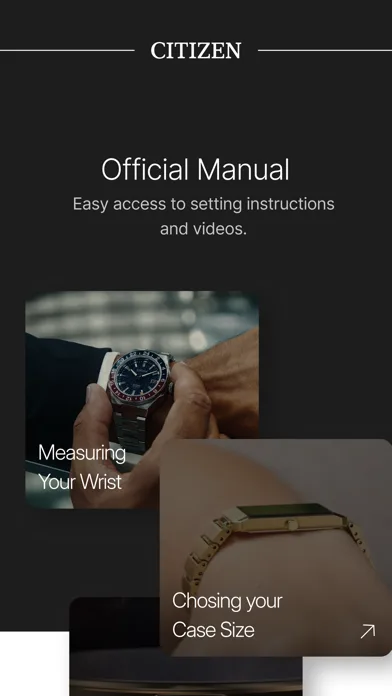
Once your watch has been identified, My Citizen provides access to its setting instructions and available specifications. This gives you a convenient digital reference whenever you need information about how to configure or use your watch.

Activate Your Warranty

My Citizen allows eligible users to activate their watch warranty directly through the app. U.S. residents can also receive an additional year of warranty coverage at no extra cost when eligible. Proof of purchase can be stored in the app for easier access when needed.

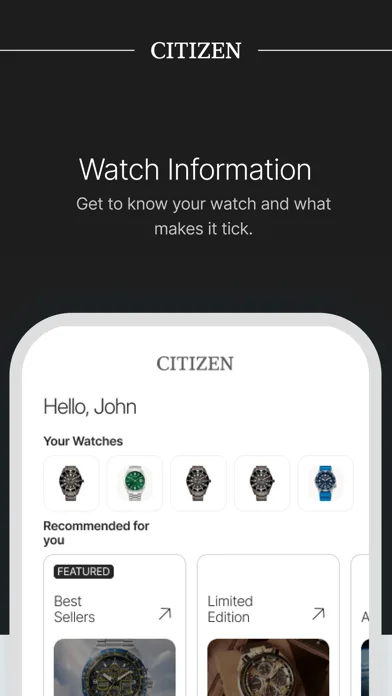
Watch Information in One Place

Instead of keeping track of paper manuals and purchase documents, you can keep important information about your Citizen watch together inside the application. This makes it easier to access the details associated with your specific model.

Customer Support

The app also provides access to support resources for Citizen watch owners. Help options and links to additional information are available through the application menu, making it easier to find assistance when you have questions about your watch.

Model Availability

Identification may currently be limited for some Citizen models manufactured before 2005 and for models produced outside the United States. The available database is being expanded over time to support additional watch models.

Key Features

  • Citizen watch identification
  • Tag scanning
  • Watch face and case-back scanning
  • Manual model and case number entry
  • Digital setting instructions
  • Watch specifications
  • Warranty activation
  • Additional warranty coverage for eligible U.S. residents
  • Digital proof of purchase storage
  • Citizen watch support resources

Your Citizen Watch Companion

My Citizen brings essential watch information, warranty management, instructions, and support tools together in one mobile app. Identify your watch in a few steps and keep the information you need available whenever you need it.

Version
Size 114.9 MB
Updated

Screenshots

About this app

My Citizen is a companion app for Citizen watch owners, making it easier to identify, register, and manage information about your watch. After identifying your model, you can access warranty details, setting instructions, specifications, and proof of purchase directly from your mobile device.

Identify Your Citizen Watch

The app provides three different ways to identify a watch. You can scan the original tag that came with your watch, use your phone's camera to scan the watch face and case back, or enter the model number manually along with the caliber and case number when available.

Three Identification Options

Choose the identification method that is most convenient for you. Tag scanning is useful when you still have the original watch tag, while camera scanning allows you to identify supported watches using your device. Manual entry provides another option when you already know the relevant watch details.

Watch Settings and Specifications

Once your watch has been identified, My Citizen provides access to its setting instructions and available specifications. This gives you a convenient digital reference whenever you need information about how to configure or use your watch.

Activate Your Warranty

My Citizen allows eligible users to activate their watch warranty directly through the app. U.S. residents can also receive an additional year of warranty coverage at no extra cost when eligible. Proof of purchase can be stored in the app for easier access when needed.

Watch Information in One Place

Instead of keeping track of paper manuals and purchase documents, you can keep important information about your Citizen watch together inside the application. This makes it easier to access the details associated with your specific model.

Customer Support

The app also provides access to support resources for Citizen watch owners. Help options and links to additional information are available through the application menu, making it easier to find assistance when you have questions about your watch.

Model Availability

Identification may currently be limited for some Citizen models manufactured before 2005 and for models produced outside the United States. The available database is being expanded over time to support additional watch models.

Key Features

  • Citizen watch identification
  • Tag scanning
  • Watch face and case-back scanning
  • Manual model and case number entry
  • Digital setting instructions
  • Watch specifications
  • Warranty activation
  • Additional warranty coverage for eligible U.S. residents
  • Digital proof of purchase storage
  • Citizen watch support resources

Your Citizen Watch Companion

My Citizen brings essential watch information, warranty management, instructions, and support tools together in one mobile app. Identify your watch in a few steps and keep the information you need available whenever you need it.

App Information

Version
File Size 114.9 MB
Minimum iOS
Release Date
App Store ID 1434809319
Bundle ID
Developer
Category Lifestyle

Related Apps

View all →