
Home › Apps › Android & iOS › VPN US using Free VPN .org™

VPN US using Free VPN .org™

Mobile Application · Android & iOS
v Android iOS 109.7 MB Free

VPN US is an iPhone VPN app built for users who want a quick and straightforward way to protect their internet connection. It combines US and international VPN servers with private browsing tools, Adblock, connection controls, and one-tap protection, making it useful both at home and when traveling.

Connect to a VPN in Seconds

Getting started is simple. Choose a server and establish a VPN connection with a single tap without going through complicated settings. You can connect to a location in the United States or select from available servers in other countries.

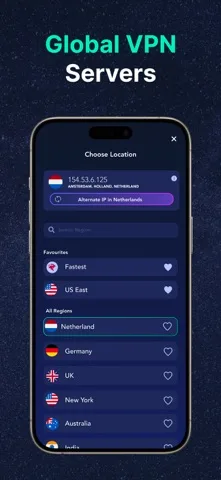
US and Global VPN Servers

VPN US offers server locations throughout the United States as well as international destinations such as the UK, Canada, Germany, France, and other regions. Switching between locations gives you more flexibility when using the internet from different networks or countries.

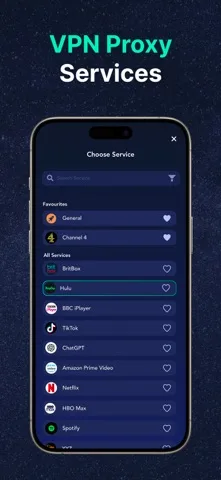
Service Presets for Popular Services

Service Presets make it easier to choose an appropriate VPN connection for different types of online services. Select a supported service or category, such as streaming, social media, sports, news, or messaging, and the app can help determine a suitable VPN connection.

Protect Your Internet Connection

The app is designed to hide your regular IP address and encrypt your internet traffic while the VPN is active. This can be particularly useful when connecting through public WiFi networks at airports, hotels, cafés, offices, and other shared locations.

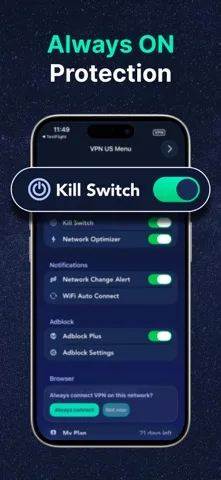
VPN US also includes AES-256 encryption and a Kill Switch. When enabled, the Kill Switch can prevent internet traffic from continuing if the VPN connection unexpectedly drops.

Automatic VPN Protection

With Auto-Connect enabled, VPN protection can start automatically on supported networks. This helps reduce the need to manually activate the VPN whenever you connect to a network where you want additional privacy.

Change or Pause Your IP Connection

The Alternate IP option lets you refresh your IP address while staying within the same general region. If you need to temporarily use your regular connection, the Pause VPN feature lets you stop the VPN and resume it again when you're ready.

Block Unwanted Ads

VPN US includes an integrated Adblock feature that can reduce intrusive advertisements and unnecessary page elements while browsing. The goal is to provide a cleaner browsing experience while keeping the VPN and privacy tools available in the same application.

Private Browser Included

You don't need to leave the application to browse privately. VPN US comes with its own private browser and several browsing modes, including a Tor mode for users who want an additional privacy-focused browsing option.

Combining the private browser with VPN protection and Adblock gives you several privacy-oriented tools without requiring separate applications.

Connection and Speed Tools

VPN US also provides tools for managing the way your connection behaves. Boost Speed offers performance-focused connection options, while Network Optimizer can adjust VPN settings according to the network you're currently using.

VPN Widgets for iPhone

iPhone users can also use VPN widgets to check their connection status and reach important VPN controls more quickly. This makes common actions easier to access without opening the application every time.

Standard and VIP Access

Standard Access includes the basic VPN connection, automatic selection of a fast connection, and core privacy features. The standard version is supported by short advertisements.

VIP Access adds more than 100 premium servers worldwide, removes advertisements, provides Auto-Connect functionality, and includes priority customer support.

Key Features

  • One-tap VPN protection
  • US VPN server locations
  • Global VPN servers
  • Service Presets for supported services
  • Alternate IP option
  • Pause VPN control
  • Kill Switch
  • Auto-Connect
  • Public WiFi protection
  • AES-256 encryption
  • Strict no-logs policy
  • Built-in Adblock
  • Speed optimization tools
  • Network Optimizer
  • VPN widgets for iPhone
  • Built-in private browser
  • Tor browsing mode
  • Standard and VIP plans

Private Browsing Wherever You Are

Whether you're connected to your home network, using public WiFi, or traveling internationally, VPN US provides a convenient way to manage your VPN connection from your iPhone. Choose a US or international location, use a Service Preset, and connect with one tap whenever you want an additional layer of privacy.

Version
Size 109.7 MB
Updated

Screenshots

About this app

VPN US is an iPhone VPN app built for users who want a quick and straightforward way to protect their internet connection. It combines US and international VPN servers with private browsing tools, Adblock, connection controls, and one-tap protection, making it useful both at home and when traveling.

Connect to a VPN in Seconds

Getting started is simple. Choose a server and establish a VPN connection with a single tap without going through complicated settings. You can connect to a location in the United States or select from available servers in other countries.

US and Global VPN Servers

VPN US offers server locations throughout the United States as well as international destinations such as the UK, Canada, Germany, France, and other regions. Switching between locations gives you more flexibility when using the internet from different networks or countries.

Service Presets for Popular Services

Service Presets make it easier to choose an appropriate VPN connection for different types of online services. Select a supported service or category, such as streaming, social media, sports, news, or messaging, and the app can help determine a suitable VPN connection.

Protect Your Internet Connection

The app is designed to hide your regular IP address and encrypt your internet traffic while the VPN is active. This can be particularly useful when connecting through public WiFi networks at airports, hotels, cafés, offices, and other shared locations.

VPN US also includes AES-256 encryption and a Kill Switch. When enabled, the Kill Switch can prevent internet traffic from continuing if the VPN connection unexpectedly drops.

Automatic VPN Protection

With Auto-Connect enabled, VPN protection can start automatically on supported networks. This helps reduce the need to manually activate the VPN whenever you connect to a network where you want additional privacy.

Change or Pause Your IP Connection

The Alternate IP option lets you refresh your IP address while staying within the same general region. If you need to temporarily use your regular connection, the Pause VPN feature lets you stop the VPN and resume it again when you're ready.

Block Unwanted Ads

VPN US includes an integrated Adblock feature that can reduce intrusive advertisements and unnecessary page elements while browsing. The goal is to provide a cleaner browsing experience while keeping the VPN and privacy tools available in the same application.

Private Browser Included

You don't need to leave the application to browse privately. VPN US comes with its own private browser and several browsing modes, including a Tor mode for users who want an additional privacy-focused browsing option.

Combining the private browser with VPN protection and Adblock gives you several privacy-oriented tools without requiring separate applications.

Connection and Speed Tools

VPN US also provides tools for managing the way your connection behaves. Boost Speed offers performance-focused connection options, while Network Optimizer can adjust VPN settings according to the network you're currently using.

VPN Widgets for iPhone

iPhone users can also use VPN widgets to check their connection status and reach important VPN controls more quickly. This makes common actions easier to access without opening the application every time.

Standard and VIP Access

Standard Access includes the basic VPN connection, automatic selection of a fast connection, and core privacy features. The standard version is supported by short advertisements.

VIP Access adds more than 100 premium servers worldwide, removes advertisements, provides Auto-Connect functionality, and includes priority customer support.

Key Features

  • One-tap VPN protection
  • US VPN server locations
  • Global VPN servers
  • Service Presets for supported services
  • Alternate IP option
  • Pause VPN control
  • Kill Switch
  • Auto-Connect
  • Public WiFi protection
  • AES-256 encryption
  • Strict no-logs policy
  • Built-in Adblock
  • Speed optimization tools
  • Network Optimizer
  • VPN widgets for iPhone
  • Built-in private browser
  • Tor browsing mode
  • Standard and VIP plans

Private Browsing Wherever You Are

Whether you're connected to your home network, using public WiFi, or traveling internationally, VPN US provides a convenient way to manage your VPN connection from your iPhone. Choose a US or international location, use a Service Preset, and connect with one tap whenever you want an additional layer of privacy.

App Information

Version
File Size 109.7 MB
Minimum iOS
Release Date
App Store ID 1091634286
Bundle ID
Developer
Category Productivity

Related Apps

View all →