
Home › Apps › Android & iOS › Bambu Handy

Bambu Handy

Mobile Application · Android & iOS
v Android iOS 278.8 MB Free

Bambu Handy — Control Your 3D Printer From Anywhere

Bambu Handy gives you convenient remote control over your Bambu Lab 3D printers while also providing access to MakerWorld's extensive collection of 3D models. Start prints remotely, monitor progress in real time, discover new designs, and bring your favorite models to life with just a few taps.

Remote Printer Control

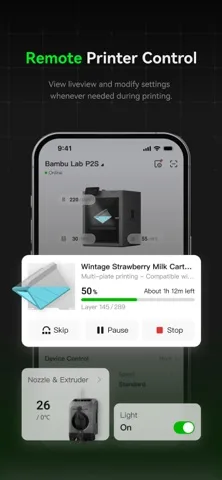
Keep track of your 3D printer even when you're away from it. Bambu Handy lets you remotely manage printing tasks, monitor the machine, and respond to problems as they happen.

  • Start and stop prints remotely
  • View real-time printing status
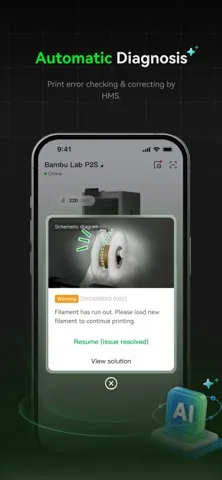
  • Monitor and respond to printing errors
  • Access learning resources and step-by-step troubleshooting instructions
  • Watch the printing process through a high-resolution live view
  • Automatically record printing processes to help diagnose failed prints
  • Create automatic timelapse videos of your prints

Explore 3D Models With MakerWorld

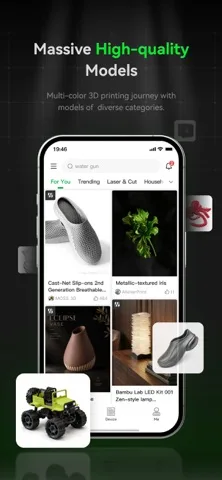
MakerWorld brings a large library of creative 3D-printable models directly to the app. Browse designs, discover popular creations, and find projects that you can print or customize.

  • Explore a wide selection of free 3D models
  • Discover trending creations from the community
  • Customize models with MakerLab
  • Like and collect your favorite designs
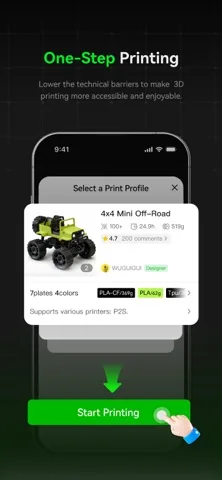
  • Send models to print with one tap
  • Interact with other makers
  • Redeem credits for Bambu products

Monitor Your Prints in Real Time

The live view feature allows you to check on your printer remotely and see how a print is progressing. Automatic process records can also make it easier to understand what happened when a print doesn't go as planned.

Create Timelapse Videos

Bambu Handy can automatically create timelapse videos of your printing process. Capture the transformation from the first layer to the completed model and share the result with friends or the maker community.

Discover, Customize, and Print

Finding a new project is simple. Browse MakerWorld, save designs you like, customize selected models with MakerLab, and send your chosen creation to your printer when you're ready.

Key Features

  • Remote Bambu Lab printer control
  • Remote start and stop
  • Real-time print monitoring
  • High-resolution live camera view
  • Printing error information
  • Troubleshooting resources
  • Automatic print records
  • Automatic timelapse videos
  • MakerWorld 3D model discovery
  • Free model library
  • MakerLab customization
  • One-tap printing
  • Model likes and collections
  • Maker community interaction
  • Credits redeemable for Bambu products

For Beginners and Experienced Makers

Whether you're completely new to 3D printing or already have experience creating your own projects, Bambu Handy brings printer management and model discovery together in one convenient platform.

Control your printer remotely, discover new models, monitor every print, and turn digital designs into real creations with Bambu Handy.

Version
Size 278.8 MB
Updated

Screenshots

About this app

Bambu Handy — Control Your 3D Printer From Anywhere

Bambu Handy gives you convenient remote control over your Bambu Lab 3D printers while also providing access to MakerWorld's extensive collection of 3D models. Start prints remotely, monitor progress in real time, discover new designs, and bring your favorite models to life with just a few taps.

Remote Printer Control

Keep track of your 3D printer even when you're away from it. Bambu Handy lets you remotely manage printing tasks, monitor the machine, and respond to problems as they happen.

  • Start and stop prints remotely
  • View real-time printing status
  • Monitor and respond to printing errors
  • Access learning resources and step-by-step troubleshooting instructions
  • Watch the printing process through a high-resolution live view
  • Automatically record printing processes to help diagnose failed prints
  • Create automatic timelapse videos of your prints

Explore 3D Models With MakerWorld

MakerWorld brings a large library of creative 3D-printable models directly to the app. Browse designs, discover popular creations, and find projects that you can print or customize.

  • Explore a wide selection of free 3D models
  • Discover trending creations from the community
  • Customize models with MakerLab
  • Like and collect your favorite designs
  • Send models to print with one tap
  • Interact with other makers
  • Redeem credits for Bambu products

Monitor Your Prints in Real Time

The live view feature allows you to check on your printer remotely and see how a print is progressing. Automatic process records can also make it easier to understand what happened when a print doesn't go as planned.

Create Timelapse Videos

Bambu Handy can automatically create timelapse videos of your printing process. Capture the transformation from the first layer to the completed model and share the result with friends or the maker community.

Discover, Customize, and Print

Finding a new project is simple. Browse MakerWorld, save designs you like, customize selected models with MakerLab, and send your chosen creation to your printer when you're ready.

Key Features

  • Remote Bambu Lab printer control
  • Remote start and stop
  • Real-time print monitoring
  • High-resolution live camera view
  • Printing error information
  • Troubleshooting resources
  • Automatic print records
  • Automatic timelapse videos
  • MakerWorld 3D model discovery
  • Free model library
  • MakerLab customization
  • One-tap printing
  • Model likes and collections
  • Maker community interaction
  • Credits redeemable for Bambu products

For Beginners and Experienced Makers

Whether you're completely new to 3D printing or already have experience creating your own projects, Bambu Handy brings printer management and model discovery together in one convenient platform.

Control your printer remotely, discover new models, monitor every print, and turn digital designs into real creations with Bambu Handy.

App Information

Version
File Size 278.8 MB
Minimum iOS
Release Date
App Store ID 1625671285
Bundle ID
Developer
Category Utilities

Related Apps

View all →